Digital Signage is a technology that replaces traditional printing signs by dynamic signs with displays of Liquid Crystal Displays (LCDs) or Light-Emitting Diode (LED) as well as embedded computer systems.
- Introduction
The Digital Signage System can deliver vivid motion pictures and crystal clean pictures to capature consumers' attention instantly. In addition, advertising can be upgraded, distributed, and expressed effectively through Digital Signage Network.
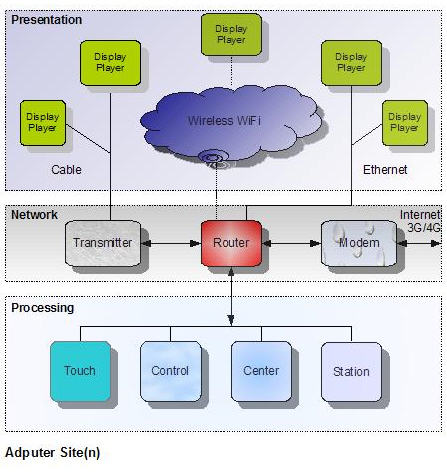
Adputer Solution for Digital Signage.
Digital Signage is suitable for any companies with a physical office that can advertise their services and products on site. They can be
- retail stores, grocery stores, shopping malls, and supermarkets
- banks
- restauants and bars
- hotels, travel agences
- tradeshows, museums, theaters, casinos, airports
Cases of Digital Signage Applications:
- McDonald's operator makes a splash with digital signage
Operations manager Wayne Adamczyk who has managed McDonald’s stores for more than 30 years, said he wanted to give the signs a Las Vegas feel, with lots of color and motion.
- Sign of the times: digital signage industry by Laura Bogomolny
Retailers should use Digital Signage as a strategic tool "to drive consumers into purchasing categories they weren't going to consider, like higher-margin private-label products." For example, Tim Hortons' use of 42-inch plasma screens to promote coffee-and-doughnut combos in the morning and lunch specials at noon.
- Digital Signage Design
Unlike TV or web ads, Digital Signage Ads can bring rich visual effects to viewers. For example, Digital Signage focuses more on visual effects instead of sound. A Digital Signage System may have one or multiple large screens, animation text called ticker, and multiple seamless zones. Furthermore, it may have remote wireless or internet access and control.
 A zone blending picture of Cherry Blossoms with saturated light and vivid color by Ladybug Mixer Pro.
The famous AIDA Formula in the advertising represents Attention, Interest, Desire, and Action. Attention is the process of turning one's mind to a particular activity. Media illustration is to obtain interest of viewers. Desire fills a particular need. Action causes the viewer of ads to go ahead. Advertising elements in the Digital Signage are designed around the AIDA formula as well.
Headline is to gain attention of viewers. It may include product or company name, command, question, superlative, and product advantages. Usually headline uses big font and animation texts.
Illustration is to obtain interest of viewers. There are video, photograph, drawing, and sketch.
Copy tries to change wants into needs. It creates desire to buy, look into, or pursue. It is the written part of the ads, explicit and implicit meanings of words.
Signature leaves the information of who and where as well as product name, trademark, or company logo.
 Ladybug Mixer Professional Ladybug Mixer Professional
|
- Adputer Digital Signage Solution
Neatware's Media Mixer and Player software have been applied in the Adputer Digital Signage System of Adputer Inc. Adputer Digital Signage Solution consists of Digital Signage Player, Center, Display, and Network.
Adputer Digital Signage Player
A good Digital Signage Player should be able to play Full HD 1080p videos in real-time. It should be able to play multiple videos and display them in multiple windwos. Furthermore it should support network connection both wireless and internet. Finally a Digital Signage Player should make content management easy.
Adputer Digital Signage Center
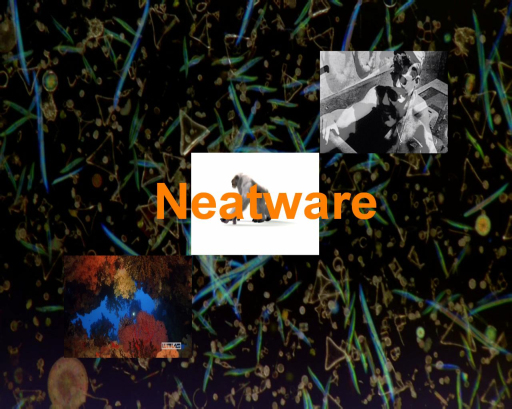 Picture-in-Picture: 3 in 1 by Ladybug Mixer
Digital Signage Center is a media center that provides real-time media composition, content management and publishing. It includes Content Creation, Content Management, Device Management, Schedule Management, and Control Management.
Picture-in-Picture: 3 in 1 by Ladybug Mixer
Digital Signage Center is a media center that provides real-time media composition, content management and publishing. It includes Content Creation, Content Management, Device Management, Schedule Management, and Control Management.
Adputer Digital Signage Network
Digital Signage Network connects Digital Signage Display, Players and Center altogether through LAN or Internet. The Local Area Network (LAN) can be connected via wireless or Ethernet. Internet can be connected through Cable, DSL, or WiMax.
Adputer Digital Signage Display
To achieve the best ads effects a large screen is required for Digital Signage Display. Usually the screen size is over 32 inches that the price is affordable at current market. Today larger LCD screens are become less expensive.
- Dynamic Advertising
By using new technologies such as GPU and multiple channel video engine, Ladybug Mixer can demonstrate new stunning advertising effects. For example, Chroma Key Ads, Curtain Ads, Frame Ads, and Zoning Ads can be easily generated with real-time multiple channel video mixing and programmable FX shaders.
Chroma Key (Green Screen) Advertising
Chroma Key is a technology that compsites a foreground video along with a background video. The foreground video can be an actor in a room surround by a green wall while a background video can be a beach. The value of chroma key is the value of green color. Both foreground and background videos can be composited so that the green scene of the foreground can be replaced by the corresponding scene of the background video.
1) Chroma green picture. 2) Video snapshot. 3) Chroma key remix.
Curtain Ads
Curtain Ads is the mixing of a picture and a video or another picture while the first picture moves like a curtain to cover the second media gradually. Curtain ads makes a sense of mysterious to audiences who may be attracted by the disclosure of content gradually. And audiences may pay longer time to watch the ads. The procedure to generate a curtain ads is simple in Ladybug Mixer.
Frame Ads
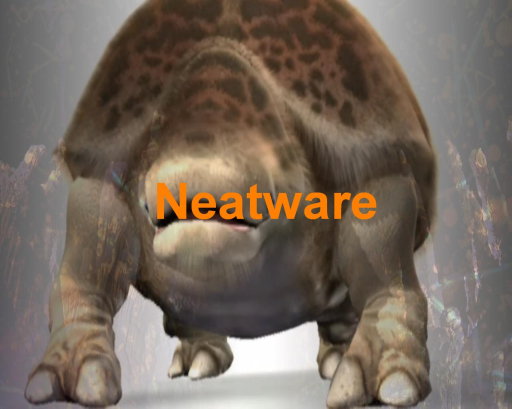 Headline Neatware text; Illustration HD video; Effect Circle Wipe
A headline video is mixed with an illustration video by wipe effect in special position. The headline video can be in the center of the display while the illustration video can be displayed around the headline video like a frame. A signature can be overlay on the bottom of the headline video as a watermark. The videos can be replaced as pictures.
Headline Neatware text; Illustration HD video; Effect Circle Wipe
A headline video is mixed with an illustration video by wipe effect in special position. The headline video can be in the center of the display while the illustration video can be displayed around the headline video like a frame. A signature can be overlay on the bottom of the headline video as a watermark. The videos can be replaced as pictures.
Zone Blending Ads
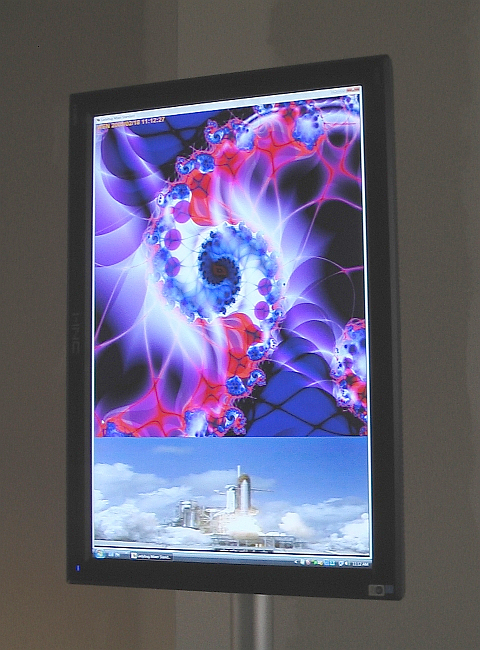
Different kind of content can be displayed on each zone of a screen. Ladybug Mixer Professional add the Zone Blending technology to display multi-channel video in seamless.
It is easy to show a zoing advertising in following steps by using Ladybug Mixer Professional: 1) Make a video: shoot and cut a video clip. 2) Make a sign: edit a group of photos. 3) Make a ticker: input a text for ticker. 4) Select a zone blending shader 5) Adjust alpha value for effect 6) Save configuration.
Portrait zone blending and LCD display.
Triptych Ads
A triptych (tri - "three", ptych - "fold") is from early Christian art, which three carved panels are folded and/or flated as a Pad. 2-panel and multi-panel are called diptych and polyptych respectively.
Ladybug Mixer * implement the effects of diptych, triptych, and polyptych by applying multi-zone shaders on multi-channel pictures/videos. Moreover Ladybug Mixer * can apply zone blending to blend triptych into one smoth picture.
A zone blending picture of Cherry Blossoms with saturated light and vivid color by Ladybug Mixer Pro.
Triptych advertising can be used for banner ads and multiple screen ads. An interesting application of triptych advertising is on mobile phone and table advertising.
- Realtime Embedded Advertising
Embedded Advertising or sometimes called Product Placement inserts ads inside content in smooth way. It is a widely applied type of advertising in movie and TV. The realtime embedded advertising mix both content and advertising channel in realtime for display. There is no stored media file to be generated. Usually a video mixer is required to implement realtime embedded advertising.
- Interactive Digital Signage
Large Flat LCD TouchScreen has made Interactive Digital Signage possible. To know more information of Interactive Digital Signage and Large TouchScreen please contact Neatware.





 Copyright© 2004-2016 Neatware. All Rights Reserved.